YouTube is expanding access to its AI-powered “Expressive Captions” option to all devices, which adds contextual explainer notes within captions to better capture the scene.
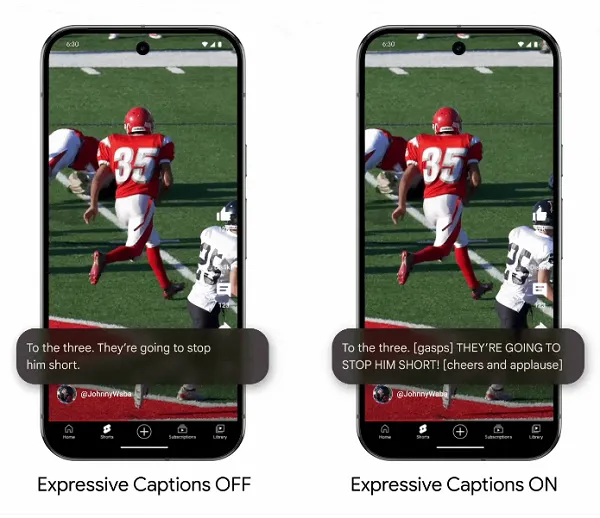
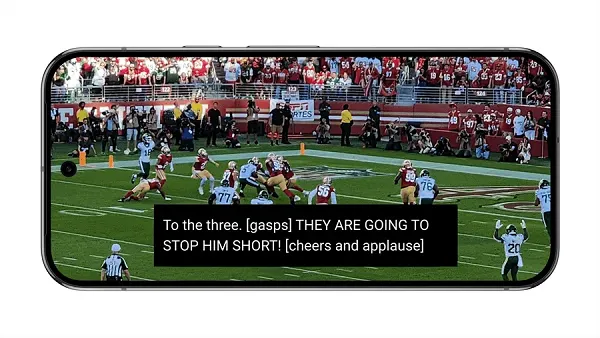
As you can see in these examples, YouTube’s Expressive Captions include additional notes on things like tone, volume, and environmental cues, in order to better convey the sense of the moment within its text descriptions.
As explained by Google, those additional elements include:
- All CAPs: Captions will now reflect the intensity of speech with capitalization, so you’ll know when a friend excitedly wishes you a “HAPPY BIRTHDAY!”
- Vocal bursts: You’ll see even more sounds identified, like sighing, grunting and gasping, giving you essential expressions of tone.
- Ambient sound: We’ll label additional noises in the foreground and background, like applause and cheers, to give you a fuller picture of what’s happening in the environment.
Using Google’s DeepMind system, expressive captions are designed to understand broader elements of a broadcast in order to add in these additional contextual markers, which can make for a more inclusive, expressive experience.
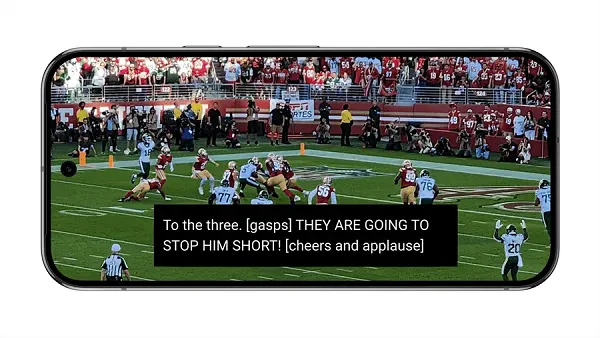
As per Google:
“Using multiple AI models, Expressive Captions not only captures spoken words but also translates them into stylized captions, while providing labels for an even wider range of background sounds. This makes captions just as vibrant as listening to audio. It’s just one way we’re building for the real lived experiences of people with disabilities and using AI to build for everyone.”
Expressive Captions were first launched on Android last December, and they’re now being made available on all English-language videos on YouTube uploaded after October this year.
It could be a handy option for expanded viewing opportunities, both for people with hearing difficulties and those viewing in sound-off situations. And I guess, mostly it comes down to your own personal preference, and how much additional color you feel these inserts add to the context.
Either way, it’s another consideration for your YouTube experience.